

A Jones
Members
-
Joined
-
Last visited
Everything posted by A Jones
-
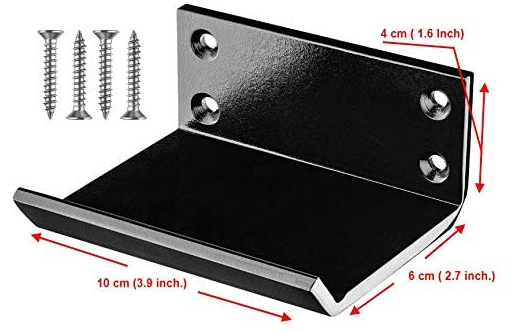
Hi. Just to clarify, we have been pushing doors with our feet or elbows where possible but this device is used to draw the door towards you using your foot instead of pulling at the handle with your hand.
-
Many thanks for your detailed and helpful advice. Our COVID-19 workplace risk assessment has highlighted the need to reduce as many touch points as practicably possible and as a result we are considering many options such as using this device.The plan is to out-source the manufacturing of these units to a local engineering company, so unfortunately a fire performance test would not be available. I've suggested using 2mm thick washers as spacers to reduce the surface area contact of the metal plate, do you think that would be of use? I'll also look at redesigning the plate, with chamfered corners and possibly an additional screw hole in the centre. Agreed that durability may be an issue on fire doors but it may be that we end up using this device only for non-fire doors such as toilets and use bolts as fixings. Again, many thanks.
-
Hello Quick question regarding fire door integrity using a foot operated door opener. Would this be acceptable to fit on the base of a fire door based in an educational environment? Many thanks Alan
-
That's what we thought, we'll keep the lobby a sterile area, Many thanks!
-
Any suggestions/comments would be greatly appreciated.
-
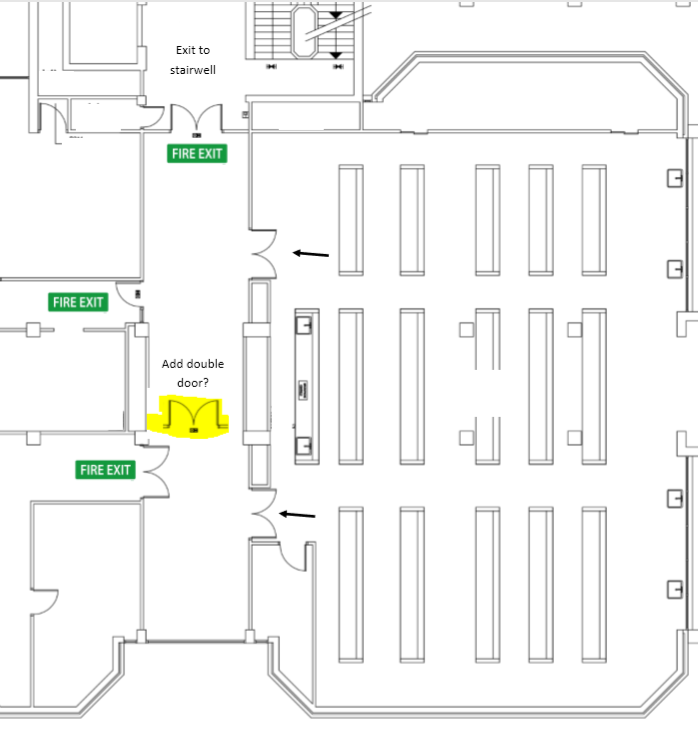
Morning, hope you can help with a query. A fire risk assessment has highlighted an issue with a teaching lab in our college. The lab accomodates up to 100 students The lab has 2 double exit doors which lead to a lobby area The max travel distance from the lab to the doors leading to the protected stairwell is 35m Area is referred to as normal risk Would you consider the following statement from the FRA to be correct? The main lab on the first floor has the capacity to hold up to 100 occupants. While it has two entrance doors these both lead to the same lobby and therefore cannot be considered alternative exits. Approved Document Part B advises that any room with a capacity of over 60 should have alternative exits. If correct, in order to allow for the occupancy to be more than 60, could we segragate the lobby (with automatic closing double doors highlighted in yellow)? We would also ensure all doors open out. Many thanks Jones
-
Excellent, many thanks Anthony, I can pass this info on the the management.
-
Hello. This enquiry is split into 2 issues involving separate final exit doors. 1. An exit door incorporates a manual push bar and also a mag lock with a push-to-open door button (on the adjacent wall). You normally have to push the button and then the bar to open the door. During a fire drill, it was found that mag lock did not go into fail-open ie you still had to push the button then the push bar to get out. This area is potentially used by more than 60 people although there is another safe exit on the other side of the building. 2. Another final exit door, opens inwards as otherwise the door would open into an external corridor. I have suggested moving the door frame slightly further in to facilitate the door being opened outwards without obstructing the corridor.This area is used by less than 20 people. I would be grateful if you could provide any advice on whether either of these conform to current fire regs? Many thanks! Jones