

Duckworth
Members
-
Joined
-
Last visited
Everything posted by Duckworth
-
Are Water extinguishers required to have a 5 year discharge in BS5306-3, i was always under the impression that they did but our latest extinguisher company who completed our most recent annual inspections state that water (and powder) extinguishers are not required to have a 5 year discharge under BS5306-3. can anyone confirm either way, feels nice that the company are not selling something that's not required if that is the case....
-
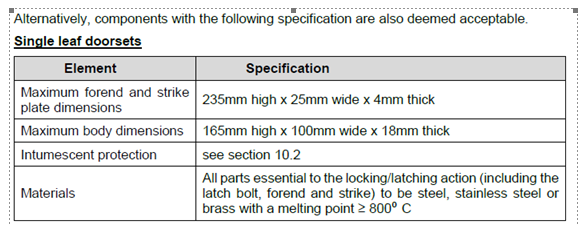
Hi Longshot this one but I'm looking for a number coded lock for both 30 min and 60 min doors, these doors aren't on fire escape routes but will be required as the only mechanism of keeping the door shut. The blanks being utilised are from Flamebreak and the following is from the FOA both 30 and 60 mins are pretty much the same.... Any help would be greatly appreciated
-
Antony Thanks for the response and clarity on this, really appreciated
-
Hi All anyone know the latest information on the ban of AFFF extinguishers, seems to be a lot of conflicting information on their use past July 2025, but I cant find anything that links any of this information back to any legislation..?