Skip to content
View in the app

A better way to browse. Learn more.

Safelincs Fire Safety Forum

A full-screen app on your home screen with push notifications, badges and more.

To install this app on iOS and iPadOS
  1. Tap the Share icon in Safari
  2. Scroll the menu and tap Add to Home Screen.
  3. Tap Add in the top-right corner.
To install this app on Android
  1. Tap the 3-dot menu (⋮) in the top-right corner of the browser.
  2. Tap Add to Home screen or Install app.
  3. Confirm by tapping Install.

Emma B

Members
  • Joined

  • Last visited

Everything posted by Emma B

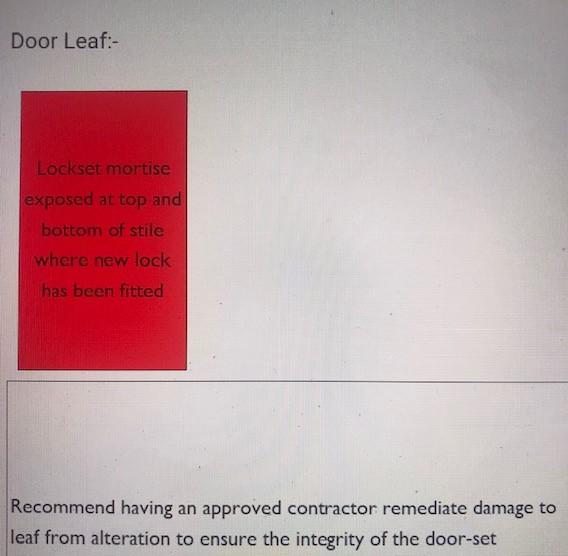
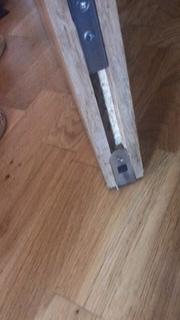
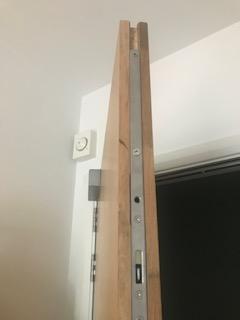
  1. My fire door has just been inspected in high rise flats. There are a couple of gaps at the top and bottom of the door where a new lock has been fitted. Is there a type of fire resistant filler that I can use to rectify this, could I fill the gaps with an wood or would I need to repurchase the original lock and replace? I'm really looking for the cheapest option that would pass the next inspection. Also, would I need professional certification on any work that was carried out? Thanks!
Account

Navigation

Search

Search

Configure browser push notifications

Chrome (Android)
  1. Tap the lock icon next to the address bar.
  2. Tap Permissions → Notifications.
  3. Adjust your preference.
Chrome (Desktop)
  1. Click the padlock icon in the address bar.
  2. Select Site settings.
  3. Find Notifications and adjust your preference.