John W
Members
-
Joined
-
Last visited
Everything posted by John W
-
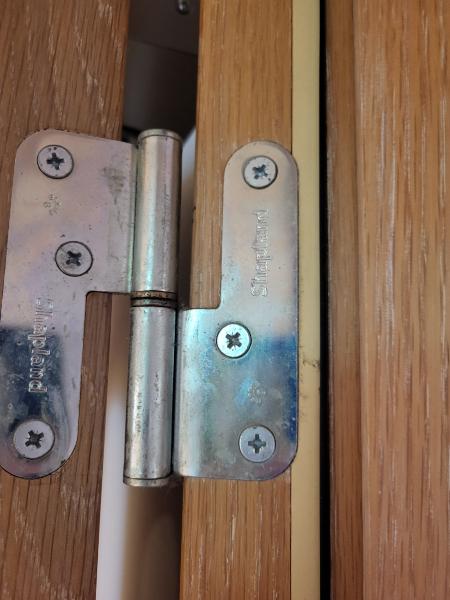
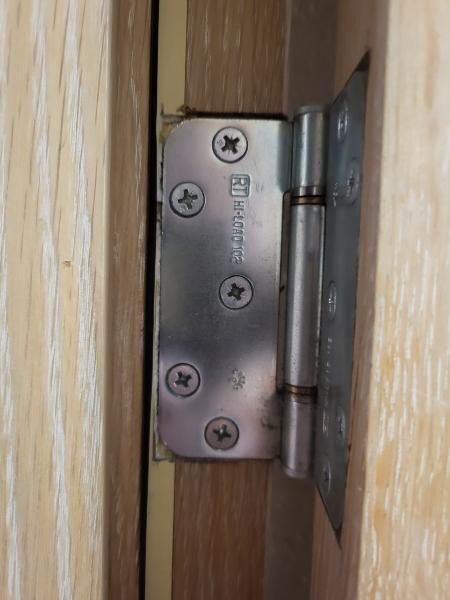
Thanks for that Mike. From a maintenance point of view is acceptable to cut the new seals in the same way as the old ones I am replacing? (As pictured above)
-
I am replacing the intumescent seals in a small theatre. It seems when they were installed in 1997 the chippy trimmed bits out to accommodate the hinges. I'm unsure if it was acceptable for the intumescent seal to be cut to accomodate door furnature on a FD30 fire door and is it acceptable to replace in the same way. Do I need to 1 - relocate all the hinges to clear the channel for the strip 2 - cut the strip either side of the hinges and fill the channel 3 - trim the new seals in the same way as the old ones. The door sets came from Shapland, I can't find any data about them. **sorry originally posted this under the wrong heading**
-
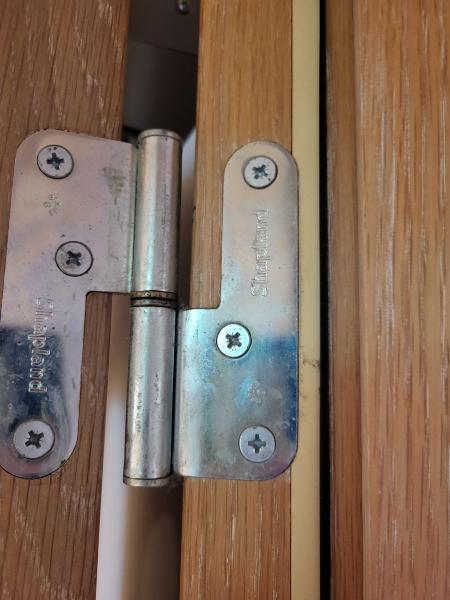
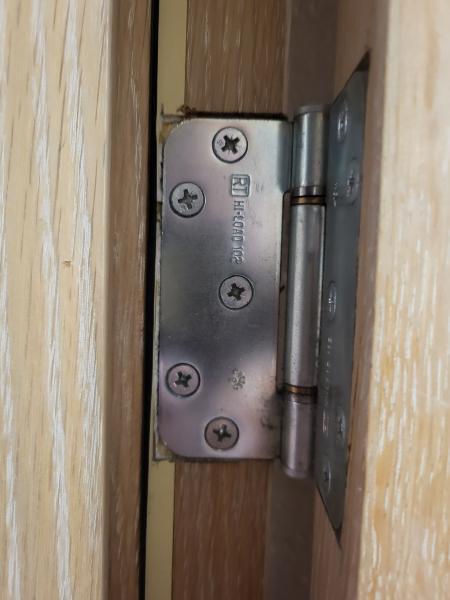
I am replacing the intumescent seals on the firedoor frames of a small theatre. It seems when they were installed in 1997 the chippy cut bits out to accommodate the hinges, this cant be right. Do I need to relocate all the hinges to clear the channel for the strip or can I cut the strip either side of the hinges and fill the channel? The door sets came from Shapland, I can't find any data about them.