
Skip to content
View in the app

A better way to browse. Learn more.

Safelincs Fire Safety Forum

A full-screen app on your home screen with push notifications, badges and more.

To install this app on iOS and iPadOS
  1. Tap the Share icon in Safari
  2. Scroll the menu and tap Add to Home Screen.
  3. Tap Add in the top-right corner.
To install this app on Android
  1. Tap the 3-dot menu (⋮) in the top-right corner of the browser.
  2. Tap Add to Home screen or Install app.
  3. Confirm by tapping Install.

Emma14

Members
  • Joined

  • Last visited

Everything posted by Emma14

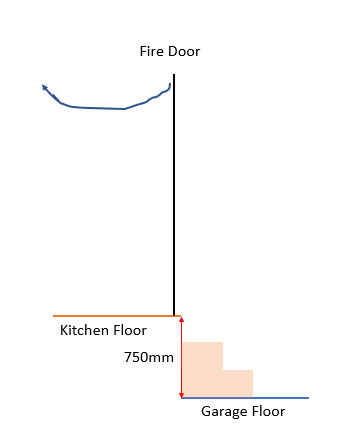
  1. Hi there, Wondered if anyone on here can help. We are adding a fire door from our kitchen to our garage. The door will open into the kitchen, and have 3 steps down into the garage as there is 750mm drop. My question is, immediately after the door, can that be the drop to the first step? As we are opening the door inwards, not onto the steps, can there be an also immediate drop after the door. Can only see info on landing in part k, nothing that really relates to this. Thanks, Emma
Account

Navigation

Search

Search

Configure browser push notifications

Chrome (Android)
  1. Tap the lock icon next to the address bar.
  2. Tap Permissions → Notifications.
  3. Adjust your preference.
Chrome (Desktop)
  1. Click the padlock icon in the address bar.
  2. Select Site settings.
  3. Find Notifications and adjust your preference.