
Skip to content
View in the app

A better way to browse. Learn more.

Safelincs Fire Safety Forum

A full-screen app on your home screen with push notifications, badges and more.

To install this app on iOS and iPadOS
  1. Tap the Share icon in Safari
  2. Scroll the menu and tap Add to Home Screen.
  3. Tap Add in the top-right corner.
To install this app on Android
  1. Tap the 3-dot menu (⋮) in the top-right corner of the browser.
  2. Tap Add to Home screen or Install app.
  3. Confirm by tapping Install.

abeda2201

Members
  • Joined

  • Last visited

Everything posted by abeda2201

  1. Hi Anthony, Excellent, thanks very much for your input. Obviously, I want things to be fire safe, so I will still seek out the assistance of Greater Manchester Fire Department to see if they can give further guidance.
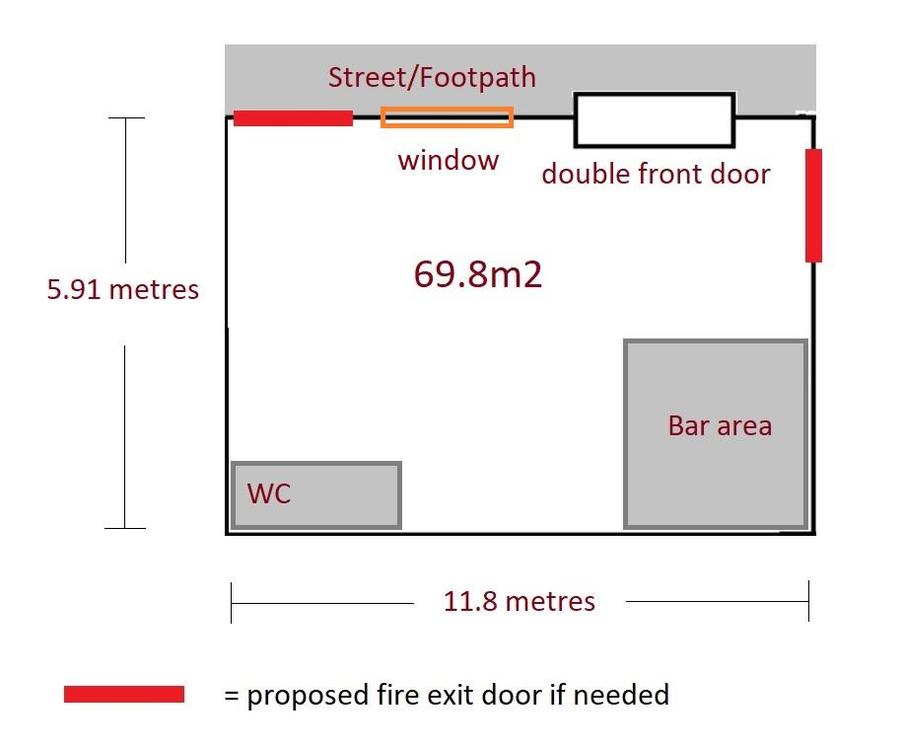
  2. Hi all, Looking for some simple advice as my local council isn't being very useful. The link they gave is just for domestic requests: https://www.bury.gov.uk/index.aspx?articleid=11065 I am looking to rent out a commercial unit as a cafe in Bury town centre but there is no current secondary means of fire escape. Please can you look at the rough plan to see if I would need to install a secondary fire escape or if one door would suffice?
Account

Navigation

Search

Search

Configure browser push notifications

Chrome (Android)
  1. Tap the lock icon next to the address bar.
  2. Tap Permissions → Notifications.
  3. Adjust your preference.
Chrome (Desktop)
  1. Click the padlock icon in the address bar.
  2. Select Site settings.
  3. Find Notifications and adjust your preference.